A DAW (Digital Audio Workstation) is the audio software you use to record, arrange, mix, and produce music – whether in a home studio or a professional recording studio. You’ll easily spend hundreds or thousands of hours using it, learn plenty of shortcuts, establish routines, and develop your own personal workflow.
In this blog post, we’ll examine which DAW is right for you and help you find out which one best meets your needs.
Key points at a glance
- You can’t find the one “best” DAW: All major DAWs today handle recording, MIDI production, editing, mixing, automation, and plugins. You can produce music professionally with any of them.
- Your purpose determines your choice: Ableton Live and FL Studio are best suited for producing and beatmaking. Logic Pro and Fender Studio Pro are ideal for songwriting, while Cubase, Pro Tools, and Reaper are best for recording and mixing.
- Key factors are the pricing model (one-time purchase, subscription, or free), your operating system, your preferred workflow (linear, clip-based, or pattern-based), and the learning curve.
- An inexpensive way to get started is with the entry-level versions of popular DAWs, such as Ableton Live Intro, Cubase Elements, or FL Studio Fruity Edition. Another option is Reaper, which offers a very affordable full version. BandLab is completely free and can be used directly in your browser.
- Skills beat software: The key to good productions, however, is your expertise in audio engineering – things like signal flow, dynamics, and frequencies – not your choice of DAW.
- HOFA-College survey on DAW usage: Among our audio engineering students, Cubase leads with 28.8%, followed by Logic Pro (19.2%), Ableton Live (17.3%), and FL Studio (15%).
- AI-powered audio software such as Suno, ACE Studio, or RipX complements the DAW for specific tasks, such as stem separation or AI vocals. They do not yet replace a full-featured DAW.
- You see Producer A using Ableton.
- Producer B insists on FL Studio.
- The big professional recording studios run Pro Tools.
- Your favourite mixing engineer on YouTube uses Cubase.
- The songwriter says Logic is unbeatable.
Which DAW is the best?
Let’s ease your mind right away: There is no such thing as THE ultimate DAW. Basically, you can produce professional music with any of the major DAWs today, as long as you have a solid foundation in audio engineering and know how to use it. One reason for this is that software have become increasingly similar in functionality over the years.
The basic functionality – audio recording, MIDI production, editing, mixing, automation, and the integration of plugins – is now standard in almost every setup, and there are certainly no sound differences between individual workstations.
Today, the differences lie primarily in the structure of the individual DAWs, their implementation of specific workflows, and the features and tools they offer for various tasks in audio engineering and music production.
So the most important question when choosing a workstation is not “Which DAW sounds best for genre X?” but rather: “Which DAW will best help me turn my idea into reality?”
So let’s start with the question:
What will you do in your DAW?
Before checking out feature lists and price comparisons, you should think about what you’ll mainly be using the DAW for:
Producing, recording, mixing, songwriting, or mastering? Each of these areas has different requirements for your audio software.
Producing
In hip-hop, trap, EDM, and other electronic genres, the sound is often created entirely “in the box.” As a producer, you work extensively with MIDI, samples, loops, software instruments and effects, and you often build your song directly within the DAW. Accordingly, a fast, creative workflow, good MIDI tools, and as little disruption as possible between the initial idea and the final arrangement are highly important.
Recording
If you mainly record bands, vocals, or individual instruments, your typical workday as a sound engineer will look quite different. You’ll often work with many takes and multiple tracks that need to be organized quickly. That’s why good editing tools, clear take management, and flexible routing play a much bigger role here.
Mixing
As a mixing engineer, you’re often sent large sessions with many tracks that need to be balanced and harmonized. This involves working with EQs, compressors, effects, and automation. That’s why clearly organized plugin organization, flexible bus and effect routing, and comprehensive, efficient automation features are essential. Even with many plugins running simultaneously, the DAW should run smoothly and stably so that you, as an audio engineer, can focus on the mix without distractions.
Songwriting
As a songwriter, you want to capture ideas as quickly as possible – often spontaneously in your home studio or on the road. Instead of having to wade through menus, routing, or technical settings, you want to be able to start recording right away, load a software instrument, or quickly build an arrangement. A DAW shouldn’t work against you here; it should make the journey from the first sketch to the finished song as straightforward as possible.
Mastering
Mastering is the final step in music production. At this stage, you often no longer work with many single tracks, but rather with the stereo mix. The goal is to refine the song’s sound, achieve the right loudness, and ensure it sounds good on as many playback systems as possible. This requires precise tools: reliable metering for loudness (LUFS), true peak, and dynamics; a simple A/B comparison with reference tracks; as well as dithering and sample-rate conversion during export. If you’re mastering entire EPs or albums, features such as sequencing songs, adding pauses and transitions, fades, setting ISRC codes, and exporting to various formats (for example, for streaming or as a DDP image for CD pressing) also become important. Some DAWs include their own mastering sections for this purpose, while others require additional software.
So what matters most when choosing a DAW?
In addition to your specific field of work, there are a few practical factors you should consider before making a decision:
- Pricing: One-time purchase, subscription, or completely free – the financial differences can be significant, and some companies have been moving toward subscription models recently.
- Platform/OS: Some DAWs run only on macOS, others also on Windows, a few only on Linux, and an increasing number in a browser.
- Workflow: Linear timeline-based workflow like in Cubase or Pro Tools, clip-based workflow such as in Ableton Live, or pattern-based workflow like in FL Studio.
- Learning curve: How quickly can you produce your first results, and how much time do you need to become proficient?
The 8 leading DAWs in detail
Ableton Live
Ableton Live is best known for its clip-based workflow in Session View: Instead of a linear timeline, you work with loops and clips that you can trigger, combine, and improvise with in real time. It’s an ideal workflow for producing electronic music, as well as for creative sound design and as a playback tool for live performances. With “Max for Live,” you have access to a visual environment for creating your own instruments and effects.
BandLab
BandLab runs entirely in the browser or as an app, requires no installation, and is free to use. This makes it by far the lowest barrier to entry in this comparison – including real-time collaboration, where multiple people can work on the same project at the same time without having to send files back and forth. The trade-off: Support for third-party plugins is limited, which makes BandLab less suitable for more demanding productions.
Cubase
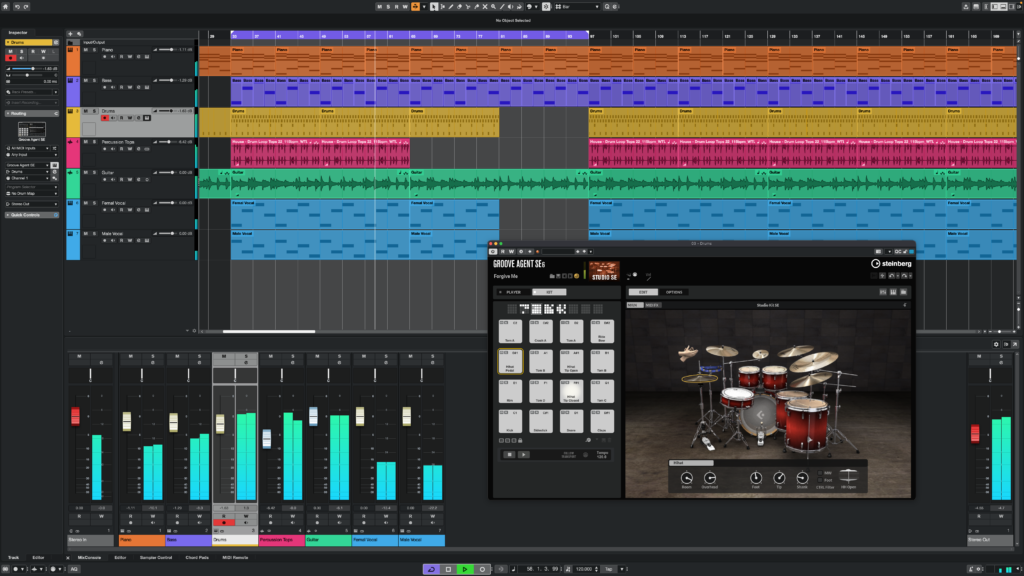
Cubase is one of the longest-running DAWs and has evolved over many years into an extremely comprehensive production tool.
One of its particular strengths remains in the field of MIDI. The Key Editor offers numerous options for detailed editing, while features such as the chord track and extensive MIDI controller options are especially helpful for more complex arrangements. Cubase also covers your recording and mixing needs to a great extent. Extensive routing options, editing functions, and automation features make the software a powerful all-around solution.
Anyone who produces, records, and mixes music will find a very comprehensive work environment here.
Fender Studio Pro (formerly Studio One)
The DAW formerly known as PreSonus Studio One has been operating under a new name since early 2026: Fender Studio Pro. In terms of functionality, it remains what it was – known for a clean user interface with an intuitive drag-and-drop workflow. The chord track and scratch pads are specifically designed to support creative songwriting, and a built-in mastering tool allows users to complete the entire process from recording to the finished master within a single software application. With the takeover by Fender, native amp and effect plugins for guitar and bass are now also included – a clear advantage for songwriters with a strong instrumental background.
FL Studio
FL Studio (Image-Line) has its origins in beatmaking and, unlike most of the other DAWs we cover in this post, operates primarily on a pattern-based system: You first build individual musical blocks (patterns) and subsequently combine them in the playlist to form a complete song. This makes quickly sketching ideas in the piano roll intuitive and explains its widespread popularity in hip-hop, pop, and electronic music production. Historically, traditional audio recording in FL Studio was considered inferior compared to recording-focused DAWs, but recent versions have seen significant improvements in this regard. One advantage that many users value is that once purchased, versions come with free lifetime updates.
Logic Pro
Apple’s Logic Pro runs exclusively on macOS and iPad, and stands out for its very reasonable one-time price (rather than a subscription) given its extensive feature set. Tools like flex time and flex pitch allow for fine-grained, post-production timing and pitch corrections without the need for third-party plugins, and the massive included sound and loop library significantly reduces the need for expensive add-ons. This makes Logic particularly popular among songwriters and producers who work on a Mac in a home studio. The downside: Anyone who collaborates across platforms with Windows users or runs a studio with mixed hardware is inherently disadvantaged with Logic.
Pro Tools
Avid’s Pro Tools is the industry standard in many recording studios as well as in the film and post-production sectors, and that’s exactly what defines the software to this day: Its session format and the AAF/OMF exchange standards are designed to transfer projects with minimal loss of quality between different studios and even different DAWs – a crucial advantage when you’re collaborating with other sound technicians and audio engineers. With HDX hardware, you can also handle very large sessions with low latency. The licensing model, though, which now relies largely on subscriptions, is a subject of heated debate. For people just starting out with audio as a hobby, Pro Tools isn’t the most obvious choice, but it’s a common standard in professional studio environments.
Reaper
Reaper by Cockos is something of an eccentric on this list: a DAW that is deliberately neutral in its essence and fully customizable, with no predefined stylistic bias. The interface, keyboard shortcuts, and workflow can be customized and automated almost at will using themes and the built-in ReaScript interface. The routing system allows for virtually unlimited sends, buses, and nested folder structures – one reason why many audio engineers value Reaper for recording and mixing. Added to this are exceptionally low system requirements and a license fee that’s very affordable by comparison. The trade-off: Reaper doesn’t do much for you in the beginning and requires active configuration – those who prefer a program that feels “ready to go” right out of the box will have to invest more time here initially.
In addition to the DAWs mentioned above, there is a number of other audio software such as Luna by Universal Audio, Bitwig, and GarageBand.
The DAWs Samplitude and Sequoia offer specialized features for orchestral production and mastering.
At a glance:
| DAW | Pricing | Platforms | Workflow | Learning curve |
|---|---|---|---|---|
| Ableton Live | One-time purchase (multiple editions) | Windows, macOS | Clip-based, session view, live performance | Moderate |
| BandLab | Free | Browser, iOS, Android | Cloud-based, collaborative | Easy |
| Cubase | One-time purchase, optional update subscription | Windows, macOS | Linear, focused on MIDI and notation | Moderate |
| Fender Studio Pro | One-time purchase or subscription (Pro+) | Windows, macOS, Linux (Beta) | Linear, single window, drag-and-drop | Easy |
| FL Studio | One-time purchase with lifetime updates | Windows, macOS | Pattern-based, focused on beatmaking | Easy to moderate |
| Logic Pro | One-time purchase with lifetime updates | macOS, iPad | Linear, with clip-based live loop additions | Easy to moderate |
| Pro Tools | Subscription or perpetual license | Windows, macOS | Linear, session exchange standard | Moderate to challenging |
| Reaper | One-time, very affordable license fee | Windows, macOS, Linux | Linear, fully customizable | Moderate |
Recommendation: which DAW is right for you?
| If you mainly … | Check out these DAWs |
|---|---|
| produce beats and electronic music | Ableton Live, FL Studio |
| write songs, arrange and record your own ideas | Logic Pro, Fender Studio Pro |
| record bands and instruments | Cubase, Pro Tools, Logic |
| mix large-scale productions | Pro Tools, Cubase, Reaper |
| want to get started in music production on a budget | BandLab, Reaper |
| want to customize your work space | Reaper |
| work exclusively with Apple devices | Logic Pro |
| work with professional recording studios | Pro Tools |
Survey 2026: these DAWs are frequently used
In this context, a survey we conducted at HOFA-College, the online academy for audio engineering and music production, is particularly interesting. In the courses, aspiring sound engineers and music producers learn professional mixing, mastering, and producing with practical exercises and real studio productions. We asked the students which DAW they prefer to use for this.
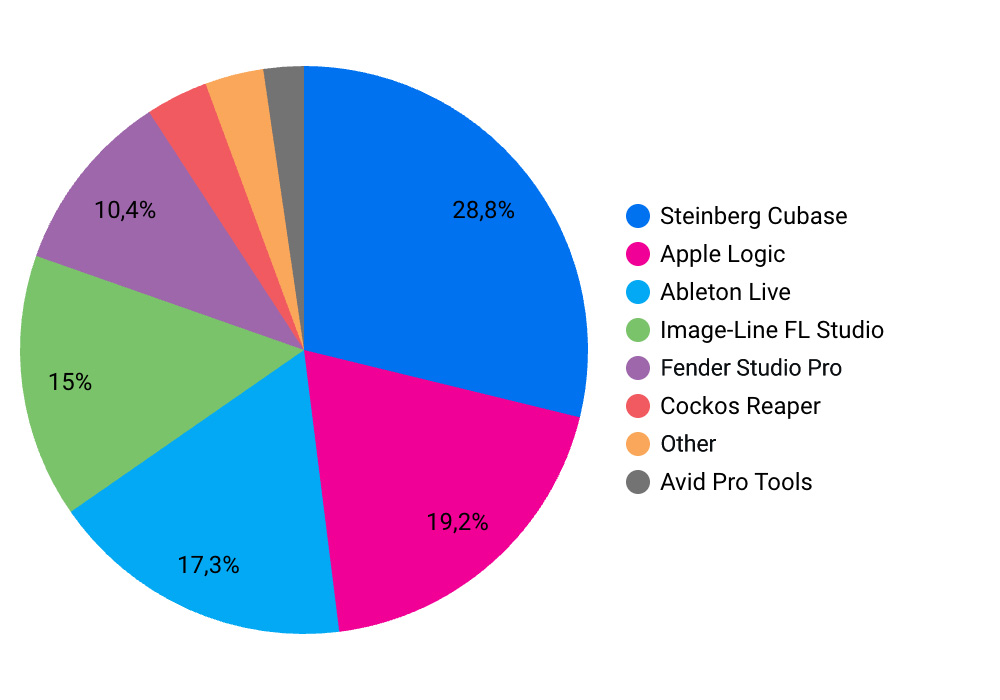
Based on the submitted votes, Cubase comes out on top with 28.8%, followed by Logic Pro (19.2%), Ableton Live (17.3%), and FL Studio (15%). Fender Studio Pro (formerly Studio One) accounts for 10.4%, while the remaining approximately 9% is split among Reaper, other DAWs, and Pro Tools.
Which AI-based audio software is available?
- Suno generates complete songs from a text prompt and, with Suno Studio, now also offers a browser-based editor that includes stem and MIDI export – intended as a source of inspiration and a sketching tool, not as a full-fledged replacement for the detailed work done in a traditional DAW.
- ACE Studio generates realistic AI vocal tracks from MIDI notes and lyrics and can be integrated directly into existing DAW projects via the ACE Bridge plugin interface.
- RipX specializes in AI-powered stem separation and note-accurate audio editing and integrates seamlessly into DAWs such as Cubase, Fender Studio Pro, or Reaper via its own ARA2 connection.
Is it worth switching DAWs?
Your first DAW doesn’t have to be your last! If you find that your DAW no longer fits your workflow, there’s no reason not to switch. Many experienced audio engineers have switched DAWs numerous times during their careers. In the past, this was almost inevitable, since the programs weren’t nearly as versatile as they are today. Anyone who wanted to cover a broad spectrum from MIDI production to recording and mixing had to learn how to use different systems.
These days, most DAWs have become powerful all-around tools. Still, it can be worth looking beyond your usual horizons, because different user interfaces often lead to new approaches and creative ideas, and broaden your experience, which will help you grow as a producer or audio engineer.
Conclusion
When choosing a DAW, it’s hard to go fundamentally wrong. What really makes the difference is how well you know your DAW. So whether you work with Cubase, Logic, Ableton, or another DAW isn’t really relevant to the quality of your productions.
On the other hand, anyone who understands signal flow, the processing of dynamics and frequencies, or the use of spatial effects will be able to apply that knowledge in any DAW.
You can learn all this and much more in the online courses in audio engineering at HOFA-College – with a hands-on approach, personalized feedback on your music productions, and completely independent of which DAW or audio software you’ve chosen.
Check out our online courses ›
You’re not sure which course is right for you? Our Course Finder can help you in just a few clicks.
References
- Ableton Live 12 (Manual)
https://www.ableton.com/en/live-manual/12/session-view/ - FL Studio
https://www.image-line.com/fl-studio/lifetime-free-updates - Logic Pro
https://www.apple.com/logic-pro/ - Cockos Reaper
https://www.cockos.com/reaper/purchase.php - Avid Pro Tools
https://www.avid.com/pro-tools/perpetual - Fender News Room
https://www.fender.com/newsroom/270270-fender-unveils-connected-music-ecosystem-with-fender-studio-pro-audio-interfaces-and-controllers/ - HOFA-College Online-Campus
https://campus.hofa-college.de/